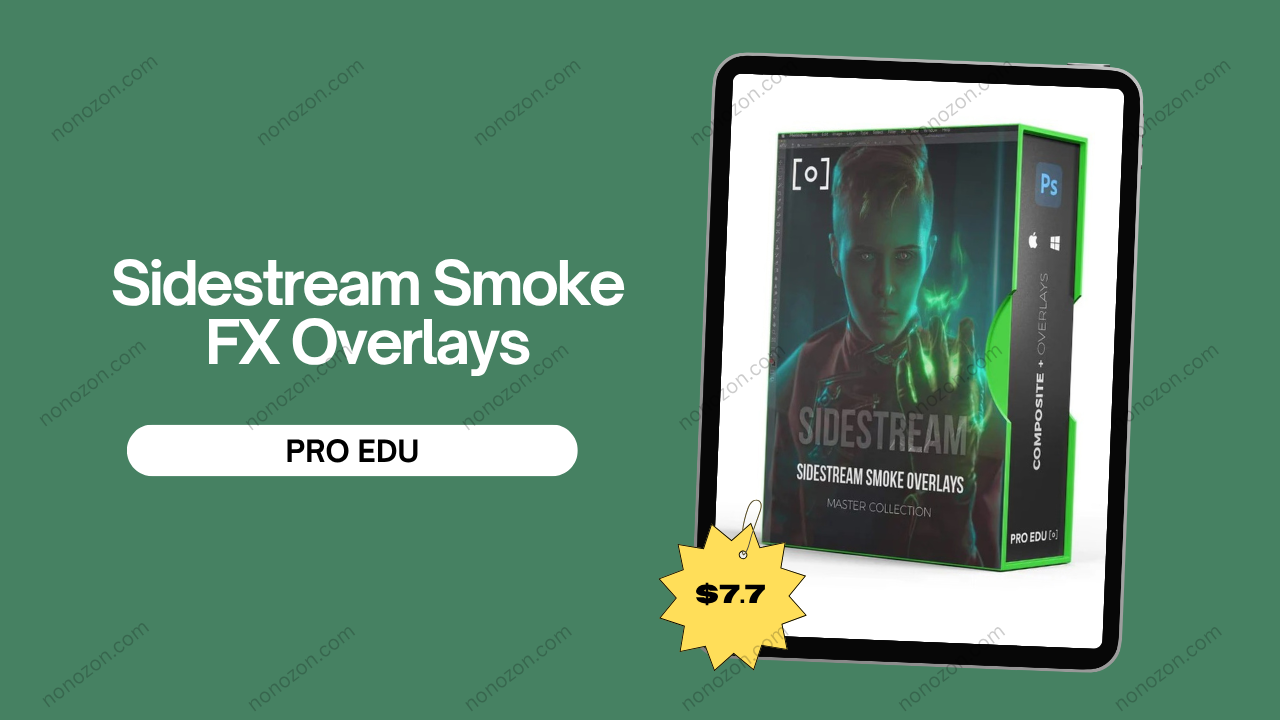
Sidestream Smoke FX Overlays
by PRO EDU
Review of Sidestream Smoke FX Overlays by PRO EDU
Check proof of content here:
For photographers and videographers seeking to infuse their visuals with compelling atmospherics, the Sidestream Smoke FX Overlays from PRO EDU are a standout choice. This robust collection of 121 distinct smoke effects offers a straightforward way to bring mood, mystery, and movement to your creative work. Whether you're crafting moody portraits, surreal composites, or cinematic landscapes, these overlays add a professional layer of depth that sets your work apart. In a market overflowing with visual content, standing out is everything—and these overlays can be your subtle, yet powerful, secret weapon.
Features of Sidestream Smoke FX Overlays
What makes this overlay pack a must-have is its thoughtful design and high production value. The 121 smoke overlays are inspired by the natural curls and swirls of sidestream smoke—like that rising from a lit cigarette. This lends them a realistic, organic appearance that’s ideal for artistic storytelling. Delivered in high-resolution JPEGs, the overlays maintain crisp details when scaled or blended.
Key Features:
Extensive Quantity: 121 overlays for endless creative combinations.
Natural Look: Mimics real-world smoke with wispy trails and billows.
High Resolution: Maintains sharpness and detail across print and digital formats.
Simple Integration: Compatible with Photoshop and most editing software.
Altogether, these features make this pack a versatile and valuable tool for visual artists.
Unique Overlay Styles
One of the strengths of this pack is the diverse range of smoke effects. These overlays aren’t just slight variations—they cover a spectrum from delicate swirls to thick, theatrical plumes. This variety enables creators to select styles that enhance the tone and intent of each piece.
The overlays act like expressive brushstrokes in the hands of an artist—perfect for evoking mood or reinforcing narrative. A faint wisp can add a subtle sense of intimacy, while a dense fog might underscore tension or action. The depth and nuance this variety provides elevates ordinary edits into emotionally resonant artworks.
High-Resolution Quality
Overlay resolution matters—especially for professionals working with high-end projects. The Sidestream Smoke FX Overlays deliver at an impressive 5,760 pixels on the longest edge, preserving fine detail and ensuring visual fidelity even at large sizes.
Whether you're applying overlays to billboard-size prints or 4K video stills, you can resize and reposition without worrying about pixelation. This also allows for advanced adjustments—such as blur effects, color grading, and masking—without sacrificing quality.
Their resolution makes these overlays suitable for both subtle edits and bold design work, offering flexibility and dependability.
Variety of Smoke Effects
One of the most compelling features of the Sidestream Smoke FX Overlays is the remarkable diversity of smoke styles included in the collection. This expansive assortment enables creators to find overlays that align seamlessly with their artistic intent—whether that involves moody landscapes, expressive portraits, or high-energy scenes. From soft, drifting tendrils to thick, voluminous plumes, the variety supports a wide range of visual outcomes.
Such a comprehensive range dramatically influences the tone and depth of your imagery. For instance, gentle wisps can subtly enhance a serene or romantic moment, while heavier clouds lend weight and intensity to action-driven compositions. The ability to experiment with different densities and shapes allows creators to elevate otherwise flat visuals into layered, immersive scenes.
In addition, the sheer breadth of effects encourages imaginative experimentation. Rather than being locked into a single aesthetic, you’re free to blend overlays and craft unique moods tailored to your narrative. This level of adaptability enhances visual storytelling by offering new emotional angles and atmospheric depth with each composition.
Instant Download Sidestream Smoke FX Overlays by PRO EDU
Ease of Use in Photoshop
One of the pack’s standout features is how user-friendly it is. Each overlay is in standard JPEG format, so it works effortlessly with programs like Adobe Photoshop, making it accessible for both novice and experienced editors.
Integration is simple: just import, layer, and adjust opacity or blending modes to fit your aesthetic. This lets you focus more on creativity and less on technical hurdles. With a wealth of tutorials available, even beginners can achieve polished results quickly.
The overlays adapt well to different scenes, blending seamlessly and enriching the image without looking artificial.
Application in Photography and Video
This pack isn't limited to still imagery—it also shines in video production. Whether you're creating music videos, narrative films, or commercial content, these overlays add visual richness that complements the emotional tone. They serve as visual metaphors, much like a soundtrack sets mood. Used subtly or boldly, the smoke can frame characters, build suspense, or add ethereal qualities to your footage.
Enhancing Character Portraits
For character portraits, these smoke effects can dramatically amplify the mood and personality of the subject. A musician in a jazz bar, a lone thinker in an alley, or a fantasy character surrounded by swirling mist—these are just a few scenes brought to life with sidestream smoke.
Beyond mood, the overlays can also accentuate facial features, creating interplay with light and shadow that brings greater dimensionality to the portrait.
Color grading and creative blending further enhance storytelling, making these overlays a creative asset in portrait editing.
Creating Atmospheric Landscapes
In landscape work, the overlays can add mystique, movement, or emotional resonance. They invite the viewer deeper into the scene, allowing for interpretation and emotional engagement.
A sunrise over mist-covered hills becomes more evocative with smoke drifting in the foreground. A dramatic sky layered with denser overlays creates intensity and tension. Whether you’re aiming for realism or fantasy, these tools offer incredible flexibility.
Composite Art Opportunities
For composite artists, this overlay pack is a goldmine of narrative tools. Whether you're crafting surreal visuals, cinematic moments, or fantasy tableaus, the smoke overlays integrate easily with other assets to form layered, immersive scenes.
Smoke can be used to transition between elements, guide the viewer’s eye, or fill negative space in a visually interesting way. With Photoshop’s blending modes and masking tools, the possibilities are virtually endless.
Comparison with Other Smoke Overlay Packs
To make a well-rounded decision, it's worth comparing the Sidestream Smoke FX Overlays with similar products.
Sidestream vs. Floor & Whisp Smoke FX
The Sidestream Smoke FX Overlays collection features 121 distinct overlays designed to produce fine, believable smoke effects, making it well-suited for both stylized portraits and moody landscapes. Delivered in high resolution, each overlay retains clarity and texture across a variety of editing platforms. This flexibility makes it a valuable asset for photographers and digital creatives aiming to introduce subtle or dramatic atmosphere to their work.
On the other hand, the Floor & Whisp Smoke FX Overlays pack contains 70 overlays, tailored more toward injecting cinematic depth—especially in dynamic portraiture and action-oriented visuals. Although both sets offer crisp, high-quality files, the Sidestream collection’s larger library gives users more room for experimentation and nuanced storytelling. For those specifically seeking the delicate, curling smoke often seen from burning embers or incense, Sidestream is likely the better choice.
Sidestream vs. Sparks FX
The Sparks FX Overlays pack takes a different creative direction, offering over 160 overlays specifically crafted to replicate fire-related effects like sparks and flame bursts. These assets are ideal for injecting energy and motion into an image, especially when paired with Sidestream’s more subdued smoke overlays. Together, they provide a comprehensive set of tools for artists aiming to depict high-impact, fiery scenes.
The key distinction lies in their application: Sidestream is focused on delivering gentle, realistic smoke plumes, whereas Sparks centers on vivid fire elements and dynamic particle movement. Used in tandem, the two packs can dramatically enhance visual storytelling, allowing for a broader spectrum of atmospheric and cinematic effects.
Price Comparison with Competitors
At $29.00 USD, the Sidestream Smoke FX Overlays pack is competitively priced within the broader market of digital visual effects. Many similar products fall within the same price range, making it important for buyers to assess what each pack delivers in terms of value. In many cases, other smoke overlay packs include fewer assets or don’t match Sidestream’s high-resolution quality.
For comparison, the Atmospheric Composite FX Overlays—also priced at $29.00 USD—serve as an alternative for those seeking a broader mix of atmospheric elements. Still, Sidestream stands out in user reviews, often praised for its ease of use and polished production quality, which sets it apart from other offerings in this category.
User Experience and Feedback
User experience plays an influential role in the perceived value of any product, especially in creative fields where functionality and reliability are paramount. Feedback on the Sidestream Smoke FX Overlays suggests that users appreciate their performance and quality.
Customer Ratings and Reviews
The Sidestream Smoke FX Overlays have garnered a favorable rating of 4.4 out of 5 stars based on user reviews a strong indicator of customer satisfaction. Many users have lauded the overlays' quality and fluid integration into their photography and digital art projects. The pack's 121 unique overlays provide flexibility, allowing users to create stunning visuals without the need for intricate custom smoke effects.
Reviewers consistently highlight the overlays' high resolution, commenting on how they enhance the final outcome of images without compromising clarity. Feedback also emphasizes how the overlays save time in post-production while delivering professional results. Many users have noted that this pack quickly became a staple in their toolkit, showcasing the overall effectiveness and reliability of the Sidestream Smoke FX pack.
Expert Opinions on Usability
Experts in digital art and photography have also weighed in on the usability of the Sidestream Smoke FX Overlays. Many professionals praise the overlays for their realistic representations of smoke and the range of effects they provide. They describe the usability of the overlays as a major benefit, particularly for those who may be less experienced with complex compositing techniques.
Experts have pointed out that the pack is built with user-friendly practices in mind, allowing both professionals and novices to achieve incredible results effortlessly. This blend of accessibility and quality makes the Sidestream Smoke FX Overlays a valuable addition to any digital artist's toolkit, simplifying the editing process while enhancing artistic outcomes.
Common Challenges Noted by Users
Despite the overwhelmingly positive feedback, some users have noted challenges associated with using the Sidestream Smoke FX Overlays. One common issue raised involves the need for adequate software knowledge to maximize the overlays' potential fully. While the pack is designed to be easy to use, new users might struggle with understanding blending modes and layering techniques effectively.
Another challenge some users highlighted is the resolution at which the overlays render in specific projects. While the overlays boast high resolution, certain users found that adjustments made in lower-resolution projects might not yield the desired effects. Thus, a solid understand of the technical specifications and environment in which the overlays are employed is paramount for achieving the best results.
Technical Specifications
The technical specifications of the Sidestream Smoke FX Overlays provide essential insight into their capabilities and compatibility for potential users. As an artist, understanding these details can make a significant difference in how you implement the overlays in your projects.
Format and Compatibility
The Sidestream Smoke FX Overlays come in JPEG format, ensuring broad compatibility with various editing software, most notably Adobe Photoshop. This wide acceptance means artists can utilize these overlays readily without concerns regarding compatibility issues, streamlining the integration process.
Pixel Resolution Details
Each overlay is offered at a high resolution of 5,760 pixels on the longest edge. This pixel density allows for detailed manipulation during various projects while maintaining visual integrity. Whether you're working on high-resolution images or videos, this level of detail ensures that the overlays will contribute to your work without compromising quality.
Required Software for Best Results
For optimal usage of the Sidestream Smoke FX Overlays, it’s recommended to use programs like Adobe Photoshop or Adobe After Effects. These platforms enable advanced layering, blending, and manipulation key aspects needed for integrating overlays effectively.
Summary of Technical Specifications
To provide a quick reference for potential users, here is a summary of the technical specifications:
Specification | Details |
**Quantity** | 121 unique overlays |
**Format** | JPEG |
**High Resolution** | 5,760 pixels on the longest edge |
**Compatibility** | Adobe Photoshop, Adobe After Effects |
**Software Requirements** | Windows 10 / macOS Mojave or later |
By understanding these technical specs, users can better prepare for the seamless integration of the Sidestream Smoke FX Overlays, ensuring that they come away with stunning results.
Tips for Using Sidestream Smoke FX Overlays
Getting the most out of your Sidestream Smoke FX Overlays requires a thoughtful approach to blending, layering, and color adjustment. Here are some tips to help you maximize the impact of these overlays in your projects:
How to Blend Overlays in Photoshop
The first step in effective blending is to understand how overlays interact with your base images. By applying the right blending modes, you can achieve various visual effects, significantly altering the mood and atmosphere of your composition. Consider experimenting with different modes like "Screen," which allows the white smoke to blend more naturally, enhancing the overall ethereality of the image.
It's also crucial to adjust the opacity of the smoke overlay to achieve a realistic effect. Start with lower opacities and gradually increase if necessary, keeping in mind how the smoke should interact with the surrounding elements. A layer mask can also be instrumental for selectively showcasing parts of the smoke, allowing for a more controlled and nuanced integration.
Layering Techniques for Realism
"Layering" refers to integrating multiple overlays to create a more dynamic and believable scene. Using different smoke effects together can introduce depth and complexity, making the final image feel more authentic. For example, combining a soft wispy overlay with a denser one can create a richer atmosphere, akin to a foggy morning or a dynamic, smoke-filled environment.
Employing Gaussian blur on the overlay layers can help mimic the natural dispersal of smoke in the air, enhancing the realism further. This technique softens edges and integrates the overlays more seamlessly into the background, providing an even more compelling effect.
Color Adjustments for Different Scenes
An often-overlooked aspect of using overlays effectively is adjusting their colors to match the mood and lighting conditions of the scene. Smoke can appear different based on surrounding colors and lighting the warm glow of a sunset can create a vastly different atmosphere than that of bright midday sunlight.
By making adjustments to the color balance and saturation, artists can make smoke overlays adhere closely to environmental contexts. Utilizing tools like Curves or Color Balance in Photoshop allows for these enhancements, ensuring that the overlays you apply feel organic within the broader composition.
Purchase and Availability
The Sidestream Smoke FX Overlays by PRO EDU is available for purchase directly from their website, making it easy for artists to acquire this resource to enhance their digital projects.
Pricing Overview
The Sidestream Smoke FX Overlays are attractively priced at $29.00 USD, a bargain considering the extensive collection of overlays 121 unique options tailored for creating atmospheric effects. This price point provides significant value given the high-quality output and the overall flexibility of the overlays.
Membership Benefits at PRO EDU
For avid users of PRO EDU products, gaining membership through their PRO PLAN provides additional benefits that extend beyond just smoke overlays. Membership prices vary depending on the duration, with options available for 6 months, 1 year, or 2 years at discounted rates.
- Full access to all educational resources during the membership period.
- Continuous updates that include new courses and tools available for download.
- Exclusive member discounts on future purchases and more.
Membership offers artists not only tools but also insightful educational content on how to maximize their use, ensuring they get the most out of their investment in digital assets.
Where to Buy Sidestream Smoke FX Overlays
To purchase the Sidestream Smoke FX Overlays, you can visit the PRO EDU website. The overlays not only serve as a fantastic toolkit for enhancing photography and videography but also grant users access to a vibrant community of creators all of whom are engaged in learning and sharing their experiences.
Once purchased, the overlays come conveniently packaged for immediate download, enabling you to begin using them in your projects right away. This accessibility is a significant benefit for those eager to enhance their work quickly and efficiently.
In summary, the Sidestream Smoke FX Overlays by PRO EDU represents an invaluable asset for modern digital creators seeking to express their artistic visions through realistic smoke effects. This combination of comprehensive features, ease of use, and affordability ensures that artists of all skill levels can leverage the power of these overlays to enhance their photography and videography projects.
Related products

Editing Masterclass for Wedding Photographers - Reflections Academy
by Danilo and Sharon
$1.200.00
$59.50