
The Giant Tutorial
by Richard Wakefield
Review of The Giant Tutorial by Richard Wakefield
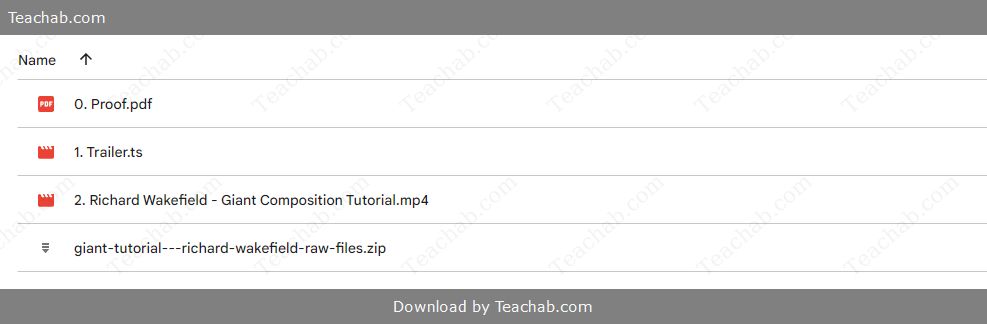
Check proof of content here:
The landscape of photography continues to shift, compelling artists to adapt, sharpen their skills, and embrace new creative challenges. One particularly captivating skill is compositing—the art of seamlessly merging multiple images into a single, unified visual. Richard Wakefield’s The Giant Tutorial, released through PRO EDU, offers an in-depth exploration of this advanced photographic technique. Known for his exceptional mastery in digital compositing, Wakefield presents a methodical and imaginative course that empowers photographers to merge artistry with technical skill. This review examines the tutorial’s structure, covered methods, hands-on value, and learner feedback to highlight why this course is a compelling investment for visual creatives.
Course Structure and Content
The course is thoughtfully designed to support progressive learning. Each module is arranged in a way that builds sequentially, helping students establish core skills before diving into more intricate processes. This gradual buildup promotes retention and practical mastery.
Breakdown of the Video Modules
The tutorial is divided into four key sections, each showcasing real-world giant composite examples crafted by Wakefield himself. These modules not only deconstruct the visual components but also expose the thinking behind each image, giving learners a rare look into the creative and technical decision-making process.
Introduction to Giant Composites: This initial segment lays the groundwork, explaining what giant composites are and why they matter in modern photography.
Real Project Walkthroughs: Wakefield breaks down four detailed case studies, guiding viewers through each step of the creation process and sharing insights into composition, planning, and execution.
Photoshop Essentials: This module focuses on Photoshop tools critical to compositing, from layer masks to adjustment layers, giving learners a toolkit they can return to repeatedly.
Live Editing Sessions: Wakefield demonstrates his process in real time, offering transparent insight into how ideas evolve and get refined on the fly.
Course Duration and Accessibility
Although the total runtime isn't explicitly listed, the course is structured to balance depth with clarity. Each module blends tutorial-style instruction with interactive exercises, giving students the opportunity to apply skills as they go.
The course is also highly accessible—playable across devices and platforms, it accommodates different learning preferences and schedules. Included with the course are full-resolution RAW files, offering users a chance to work on the same images Wakefield uses in his tutorials.
Instant Download The Giant Tutorial by Richard Wakefield

Working with RAW Files
A standout feature of The Giant Tutorial is its inclusion of the original RAW image files. This aspect turns the course into a hands-on experience rather than a passive one.
Learners can follow along by editing the exact same assets as Wakefield, which enhances comprehension and confidence. This approach bridges the gap between observation and implementation, giving users the chance to explore, experiment, and develop their own creative variations based on the lessons taught.
Techniques Explored
Wakefield’s tutorial bridges foundational and advanced techniques, delivering a comprehensive education in digital compositing. He stresses that realistic composites don’t just rely on stitching elements together—they depend on the intelligent handling of light, shadow, perspective, and narrative flow.
Creating Realistic Composites
Wakefield delves deeply into what gives composite images their believability. Key learning points include:
Scene Contextualization: He explains how elements should relate to each other in terms of perspective, subject size, and detail fidelity.
Light Cohesion: Learners gain tools for analyzing and harmonizing lighting conditions across all components of an image.
Shadow Dynamics: Wakefield outlines how to generate and refine shadows so that they reflect real-world physics, adding dimensionality to the final piece.
Blending Approaches: The course features multiple techniques for merging image elements, including the use of blend modes and masking tools for seamless integration.
Matching Light and Shadow
Harmonizing lighting conditions is a make-or-break skill in composite photography. Wakefield provides step-by-step methods for:
Light Source Matching: Understanding where light originates in each image component and adjusting accordingly to ensure visual consistency.
Shadow Creation and Placement: Detailed instruction is given on shadow geometry, intensity, and blending, helping bring scenes to life.
Highlight & Reflection Enhancement: The tutorial concludes with fine-tuning tips for adding reflective elements and light accents that finalize a realistic appearance.
Understanding Focal Distance
Another critical concept covered in the course is focal distance—a detail often missed in compositing but crucial for realism.
Replicating Depth of Field: Wakefield explains how to simulate realistic blur and focus to match in-camera effects.
Perspective Matching: The course addresses how to align angles and scales so that all elements fit naturally within the composite frame.
Visual Prioritization: Techniques for guiding the viewer’s eye through effective depth cues are included, adding visual storytelling strength.
Practical Application
The strategies and insights offered in The Giant Tutorial extend well beyond the scope of its video modules. Participants walk away with skills and systems they can apply to real-world projects and artistic endeavors.
A Repeatable Workflow
One of the course's greatest strengths is how it instills a repeatable, structured workflow for future composites:
Pre-Production Setup: Tips for collecting references, planning layouts, and preparing files before jumping into editing.
Layer Management: Emphasis on logical layer structuring, naming, and grouping to keep complex projects manageable.
Color & Light Integration: Learners experiment with blend modes and adjustments to unify all image components into a single aesthetic.
Final Polish & Review: Wakefield stresses the importance of a final quality check and refining pass to ensure professional-grade output.
Masking Techniques Explained
Masking is a powerful tool in photo editing, particularly in the context of creating composites. The Giant Tutorial delves into effective masking techniques, providing in-depth guidance on how to ensure seamless integrations of various image elements. Key topics include:
- Choosing the Right Tools: Participants learn to utilize different masking tools available in Photoshop, understanding when to use each to achieve the desired effect.
- Precision Control: Advanced masking allows photographers to make fine adjustments, ensuring that cuts around subjects are smooth and natural-looking.
- Layer Masks vs. Clipping Masks: The differences between these two types of masks are discussed, along with when to use each technique based on the desired outcome.
- Hands-On Practice: The tutorial incorporates practical exercises that encourage participants to experiment with mask applications, creating a more robust understanding of this vital skill in digital editing.
Color Grading Mastery
Finally, the Giant Tutorial addresses the crucial element of color grading, enabling participants to elevate their images through thoughtful color adjustments. Wakefield illustrates:
- Understanding Color Relationships: Gaining insight into how different colors interact can significantly impact the overall mood of an image.
- Practical Applications: The tutorial covers tools within Photoshop dedicated to color grading, including curves, levels, and HSL sliders.
- Creating Cohesion: Techniques for ensuring all elements within a composite share a consistent color palette are highlighted, reinforcing the importance of unity in visual storytelling.
- Real-World Examples: Participants are shown examples of well-executed color grading, providing inspiration for their future projects.
Learning Resources
Learning resources extend beyond the tutorial itself, with several supplementary options available to enhance the overall educational experience. PRO EDU is known for providing rich educational tools and community support, making the journey a collaborative learning experience.
Included Practice Materials
In the Giant Tutorial, identified practice materials play a crucial role in the learning experience. The inclusion of RAW files allows participants to work with real images, ensuring that they have the opportunity to apply concepts learned throughout each video module.
- Hands-On Learning: Instruction on how to use practice materials effectively reinforces understanding, enabling participants to follow along as concepts are taught.
- Diverse Scenarios: The diverse range of provided images covers different subjects and lighting conditions, ensuring a comprehensive approach to compositing techniques.
- Community Engagement: Sharing practice outcomes with fellow learners can encourage collaboration, fostering an environment of shared growth and skill enhancement.
Community Support and Interaction
An essential component of successful learning, community support, enables learners to engage with others pursuing similar goals. PRO EDU emphasizes community interaction through forums, group discussions, and feedback channels. This fosters a collaborative spirit that enriches the learning experience.
- Shared Resources: Community members can share resources, tips, and techniques, broadening the pool of knowledge accessible to all participants.
- Networking Opportunities: Engaging with like-minded individuals can foster collaborations and connections that may lead to new projects or opportunities.
- Feedback: Receiving constructive feedback on work from peers is invaluable in accelerating skill development, providing different perspectives and approaches that can enhance one's art.
Additional Learning Tools
Participants in the Giant Tutorial gain access not only to comprehensive resources within the course but also to other educational tools that can enhance their journey in digital photography:
- Webinars and Q&A Sessions: The inclusion of live events with industry professionals allows for real-time learning and the opportunity to ask questions about specific topics.
- Exclusive Member Content: Subscribers may receive access to early releases of new content, ensuring they remain at the forefront of digital photography trends.
- Discounts and Promotions: Membership includes alerts about special offers and discounts on future educational products.
User Experiences
User experiences with the Giant Tutorial, as shared through testimonials and reviews, provide essential insights into the course's overall impact and effectiveness. The community response has been overwhelmingly positive, highlighting several significant aspects of the course.
Student Testimonials
Students participating in the Giant Tutorial highlight both the practicality of the content and the effectiveness of Wakefield's teaching methods. Reviews suggest that many learners feel they see notable improvements in their skills after completing the course.
- High Satisfaction Rate: Achieving a solid rating of 4.7 out of 5 stars based on user feedback reflects a high level of satisfaction among participants.
- Accessible Learning: Learners appreciate Wakefield’s ability to break down complex techniques into manageable tasks, making it easier to grasp and apply newfound skills.
- Hands-On Practice: The availability of RAW images for practice significantly enhances the learning experience, giving students the chance to implement techniques in real-time.
- Engagement and Support: Many participants commend the community atmosphere surrounding the course, appreciating the opportunity to connect with others sharing similar interests and objectives.
Common Feedback and Critiques
While the feedback surrounding the Giant Tutorial predominantly consists of praise, some recurring critiques provide valuable insights for potential enhancements.
- Advanced Techniques: Some reviews suggest that certain advanced topics could be covered in greater detail, particularly for individuals already familiar with basic compositing techniques.
- Pacing Issues: A few learners note that the pace may be quick for complete beginners, recommending prior knowledge of Photoshop and basic compositing principles for optimal understanding.
- Interactive Elements: Although community support is strong, some participants expressed interest in more interactive features such as live critique sessions or project challenges.
Overall Satisfaction Ratings
User satisfaction ratings for the Giant Tutorial indicate a strong performance in terms of quality and content delivery. With thousands of reviews backing it, the tutorial has proven to be a solid investment for photographers and visual artists aiming to enhance their skills.
- Consistency in Quality: The consistent rating of 4.7 out of 5 across over 2,100 reviews showcases the resulting value participants derive from the course.
- Impact on Skills: Many students have reported improved compositing abilities and increased confidence in their workflows after completing the tutorial.
- Recommendation: Many learners recommend the Giant Tutorial to peers and aspiring photographers, citing the practical and accessible learning experience as key factors in their positive experiences.
Pricing and Membership Options
Understanding the investment involved is crucial when considering whether to enroll in the Giant Tutorial by Richard Wakefield. The pricing structure and membership options available through PRO EDU are essential for potential participants to consider.
Cost of the Giant Tutorial
The Giant Tutorial is available for purchase at a current promotional price of approximately 69.00 USD, significantly discounted from its original price of 199.00 USD. This represents a sizeable saving for individuals interested in mastering compositing techniques, making it an accessible option for photographers at various skill levels.
Pro Plan Membership Benefits
For those considering longer-term engagement with PRO EDU's educational resources, the PRO Plan membership provides a range of benefits beyond the Giant Tutorial:
- Unlimited Access: Members can access a vast library of tutorials, ensuring they have the resources necessary to continuously hone their skills.
- Cost-Effectiveness: The price of the PRO Plan is positioned as economically favorable, allowing members to explore a wealth of courses without incurring significant additional costs.
- Exclusive Content: Subscribers gain access to unique materials and early releases of new tutorials, enhancing their learning experience over time.
Comparison With Other Courses
The Giant Tutorial stands as a compelling option among various available courses, particularly when compared to broader educational offerings within the PRO EDU library.
- Specialized Focus: Unlike broader plans, the Giant Tutorial is highly specialized in compositing techniques, allowing photographers specifically interested in creating imaginative giant images to dive deep into this art form.
- Variety of Learning Paths: While the PRO Plan allows for exploration across multiple photography disciplines, the Giant Tutorial provides intensive focus and substantial depth in a single area, catering to specific needs within the photographic community.
Final Thoughts
Richard Wakefield’s Giant Tutorial offers photographers an exceptional opportunity to master the art of compositing, with a focus on creating visually stunning giant images. With its structured content, practical techniques, and hands-on resources, this tutorial equips participants with the skills necessary to elevate their work and storytelling capabilities.
Who Should Take This Course?
This course is ideal for photographers, digital artists, and retouchers at any level seeking to enhance their compositing skills. Beginners will find the clear instructions and RAW practice files immensely beneficial, while experienced professionals can refine their workflows and discover new techniques to diversify their portfolio.
Potential Improvements
While the tutorial is comprehensive, a few enhancements could strengthen its offerings further. For instance, expanding advanced topics for professionals seeking greater depth and integration of more interactive elements could add extra value for all skill levels.
Long-Term Value for Photographers
Ultimately, the skills and techniques learned in the Giant Tutorial have a lasting impact. As photographers develop their abilities in compositing, they not only improve their immediate work but also foster creativity that enriches their artistic expression throughout their careers. By investing in Richard Wakefield's course, participants can expect significant growth, a supportive learning community, and the confidence to create captivating composite images that captivate audiences.
Related products

Landscapes with Oil Pastels and Crayons: Playing with Light
by Clara Debray
$39.00
$7.70

Retro Character Design for Animation
by Venturia Animation Studios
$39.00
$7.70